Ren'Py Repack: sign an edited save
Ren'Py 8.1, 7.6 and newer sign every save with a key kept on your computer, and editing a save breaks that signature, so the game will not load it. Upload the edited save and your security_keys.txt, and you get the same save back, signed with your key.
What this fixes
When a save's signature matches no key on your computer, Ren'Py asks before loading it: "This save was created on a different device." For a save copied from another computer of yours, answering Yes is enough. For a save you have edited it is not: the contents no longer match any signature, and after Yes the slot still does not load.
Repack writes a new signature for the save with your key. The game state inside is left as it was, so the game treats the file as a save made on your computer.
Where is security_keys.txt?
In Ren'Py's tokens folder. Normally there is one per computer, shared by every Ren'Py game on it, so the same file signs saves for all of them. A game with a folder named "Ren'Py Data" in or above its own folder keeps its tokens there instead.
| System | Folder |
|---|---|
| Windows | %APPDATA%\RenPy\tokens |
| macOS | ~/Library/RenPy/tokens |
| Linux | ~/.renpy/tokens |
On Windows, paste the path into the File Explorer address bar. On macOS, open Finder, choose Go, then Go to Folder, and paste it there.
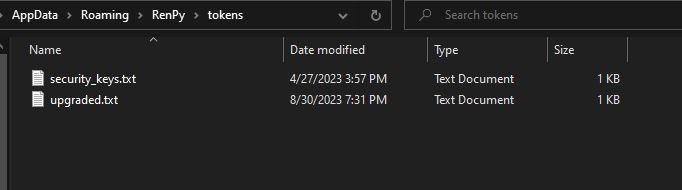
Games played in a browser do not check signatures, so their saves need no signing. Games on Android and iOS keep the file with the game's own data, and where exactly depends on the build.
If signing fails
- The key file has no signing key. Upload security_keys.txt itself from the tokens folder, not another text file or an edited copy of it.
- The save is not a Ren'Py save. A Ren'Py .save is a ZIP archive. A screenshot, or a save from another engine renamed to .save, is refused.
- The save has no signature. Saves from before Ren'Py 8.1 and 7.6 carry none. A newer Ren'Py shows the same warning for them and loads them after Yes, so there is nothing to sign.
Questions
Do you keep my save or my security_keys.txt?
No. Both files are used only while the request runs: the save is signed and sent straight back to you, and neither is kept afterwards. The key is still a private key, so only ever upload your own.
Which Ren'Py games need this?
Games made with Ren'Py 8.1, 7.6 or newer, which sign their saves. Older saves carry no signature: a newer Ren'Py shows the same warning for them and loads them after Yes. Games played in a browser do not check signatures at all.
Will the signed save work on another computer?
It loads without a warning on the computer whose security_keys.txt you used. Any other computer asks whether to trust it, the same as for a save copied from somewhere else.
Can I skip this step next time?
Yes, on a paid plan: store your security_keys.txt on your account once, and every Ren'Py save you download from the editor is signed on the way out.
To change values before signing, open the save in the Ren'Py Save Editor. For why Ren'Py signs saves and how automatic signing works, read the guide to Ren'Py save signing.